Android app · v0.4.1 · no network permission

Scroll past. Watch on purpose.

Free Social removes the short-video layer from Instagram, YouTube and TikTok — inside the real apps, through Android's accessibility service. Reels stop ambushing you. When you do want one, you spend it from one daily budget.

  • Android 12L+minSdk 32 · targetSdk 36
  • One budget3 apps · resets at midnight
  • No servers0 accounts · 0 telemetry
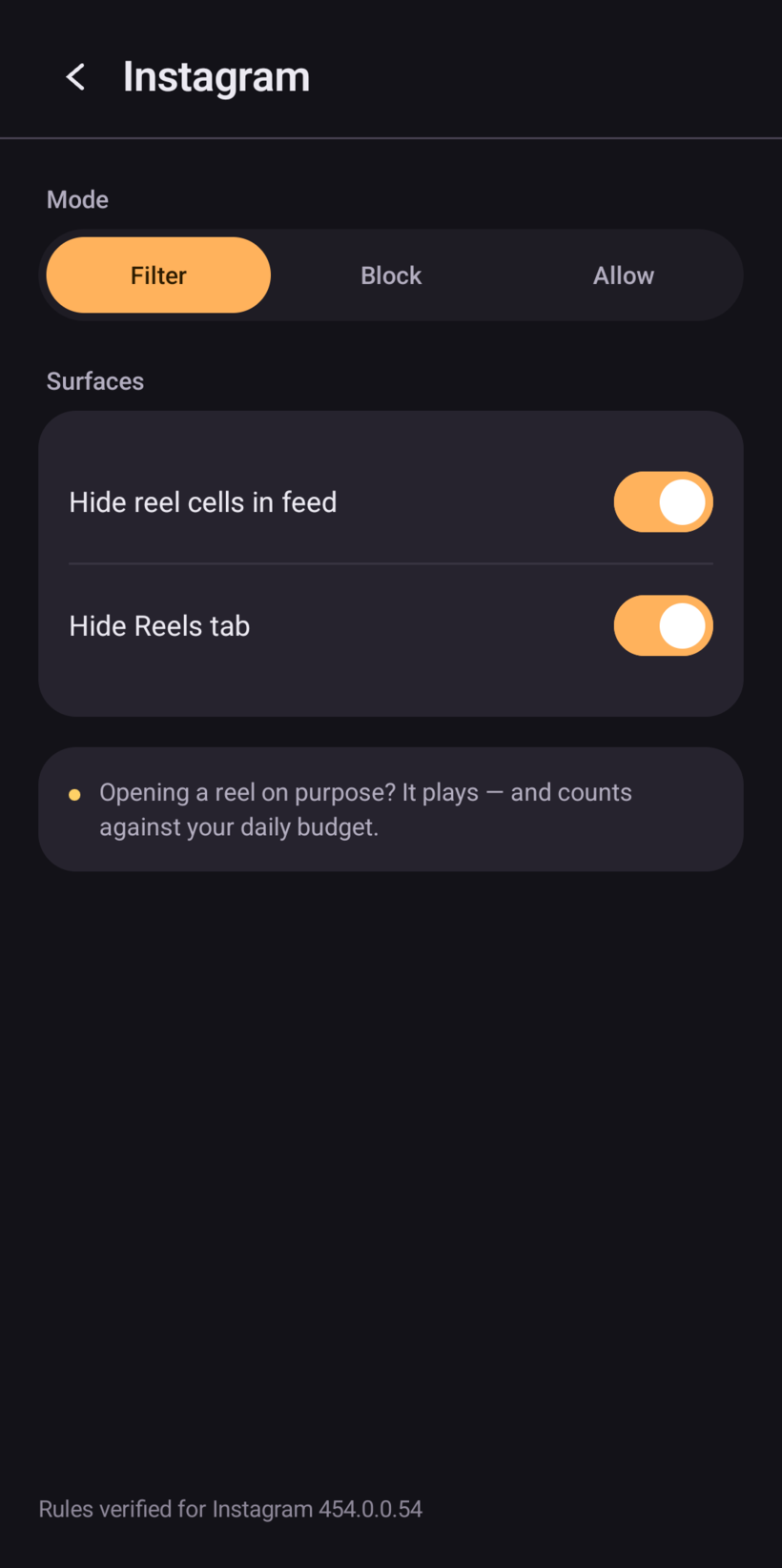
Free Social app detail screen for Instagram: mode set to Filter, with the reel cells and Reels tab hidden by toggles.
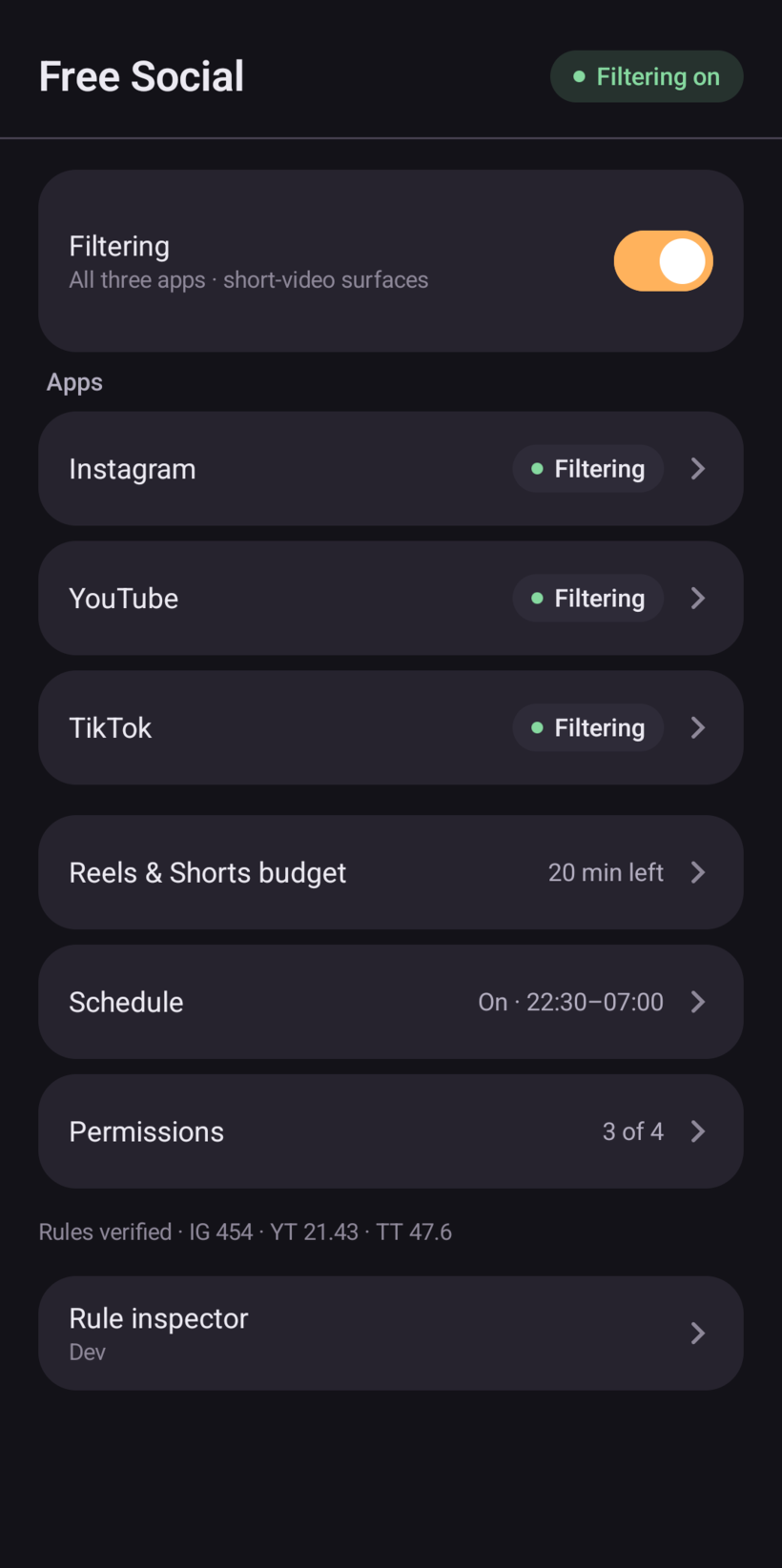
Free Social home screen: filtering on, Instagram, YouTube and TikTok filtered, 20 minutes of Reels and Shorts budget left, schedule and permissions rows.
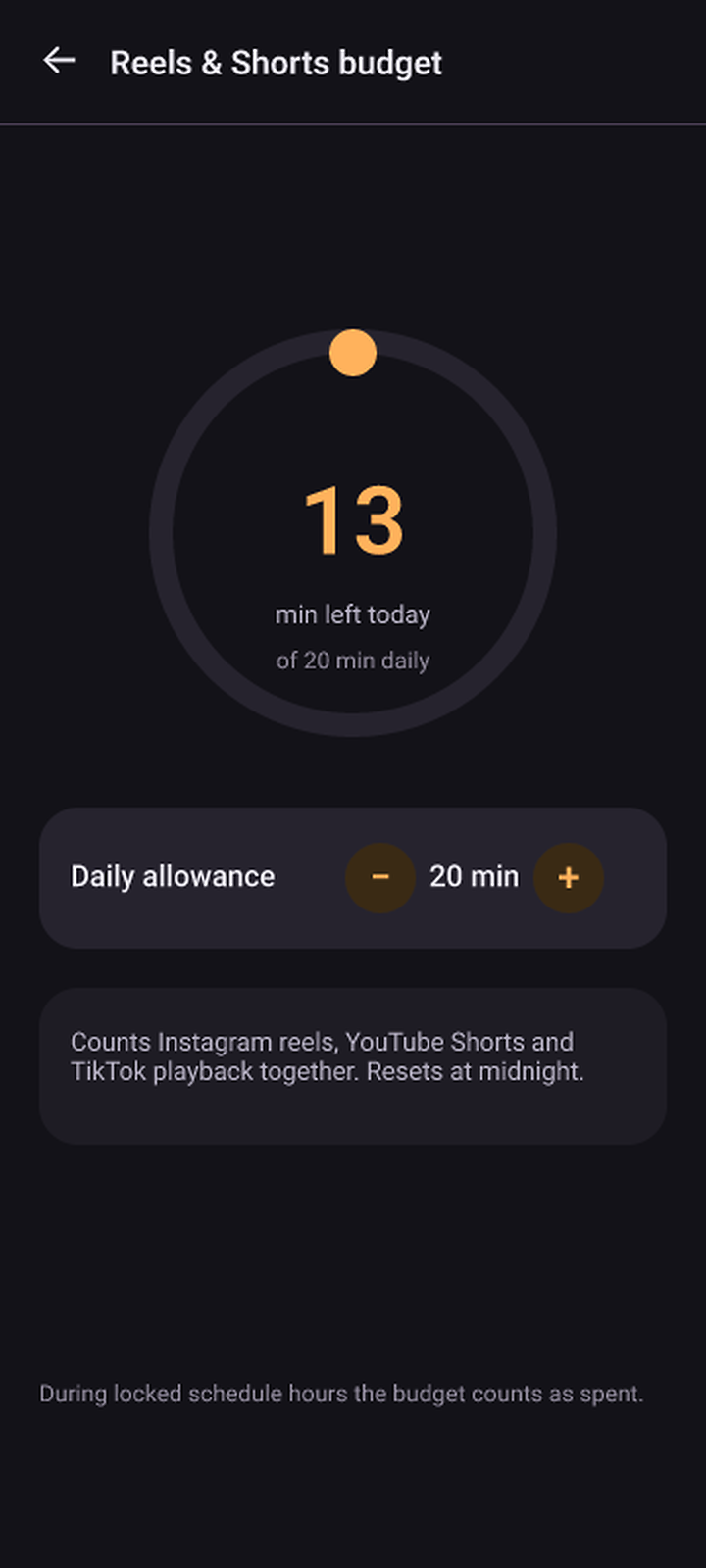
Budget screen: a ring showing 13 of 20 minutes left today, with the daily allowance stepper.

android.permission.INTERNET — not requested

01 / Setup

Three steps, about four minutes.

No account, no sign-in, no wizard that phones home. Installing is the slow part — after that the app explains every permission it asks for, in plain words.

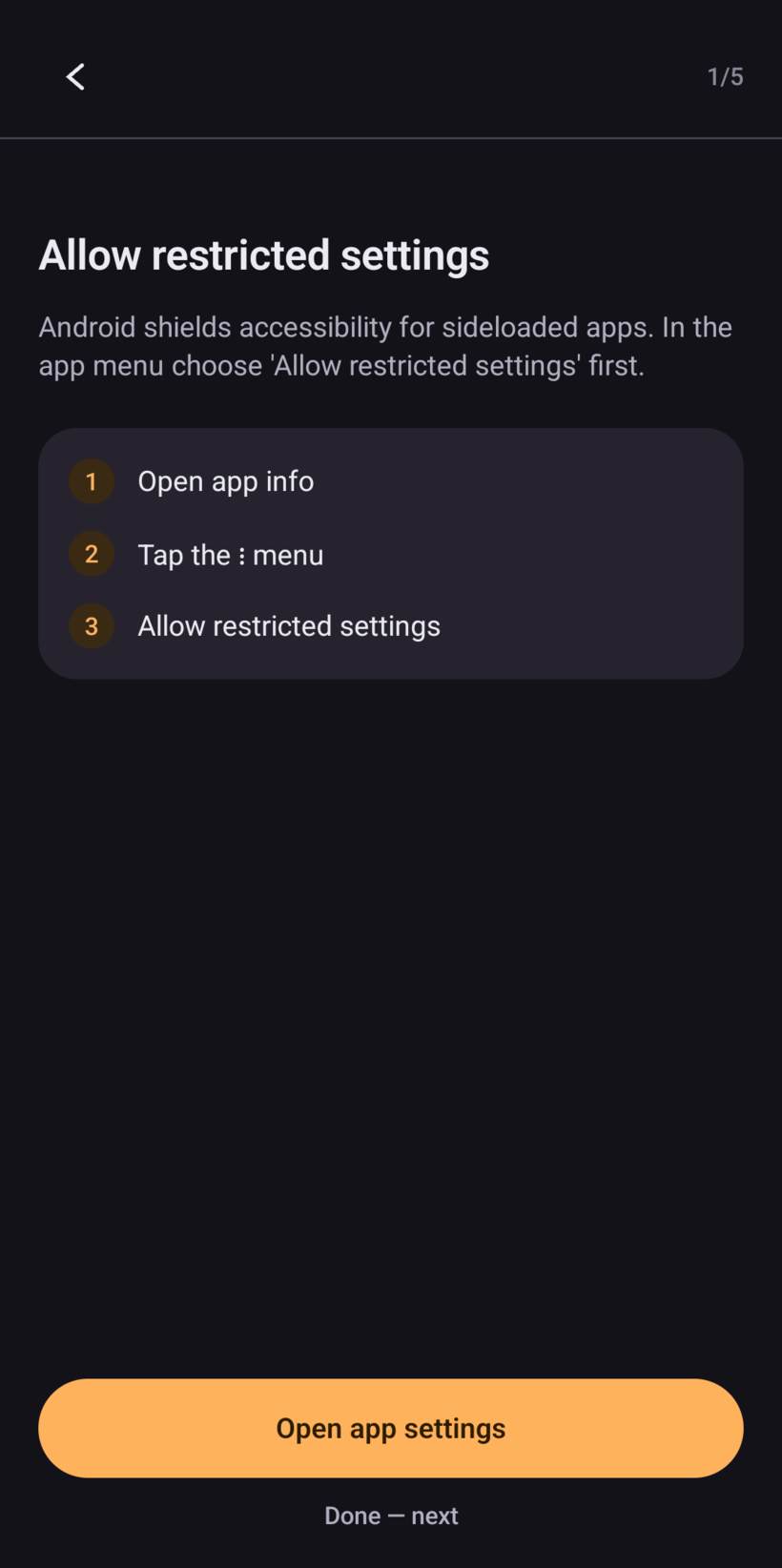
Setup card in the app: 'Allow restricted settings', with the three steps — open app info, tap the menu, allow restricted settings — and a button to open app settings.
The setup card that walks you through Android 13's restriction on sideloaded accessibility apps.
  1. 01

    Install the APK

    The download is a zip holding a signed release build and a README. Unzip it, tap the APK, allow the install from your file manager. Android 12L or newer.

  2. 02

    Enable the accessibility service

    Android 13 and later hides accessibility behind an extra switch for sideloaded apps. In app info, open the menu and choose Allow restricted settings, then switch on the content filter service. The optional block service is separate.

  3. 03

    Set your budget

    Twenty minutes a day by default — one allowance shared by Instagram, YouTube and TikTok, reset at midnight. Per app you can also choose Filter, Block or Allow.

02 / Behaviour

A filter that knows the difference between browsing and watching.

Six behaviours, one idea: the app never decides what you should see. It decides when it is allowed to interrupt.

Direct engagement

The clock only starts when you do.

Scrolling past a reel is not a decision to watch one. Free Social classifies the surface, not your intent: feed cells and shelf cards are left completely alone. The moment Reels, Shorts or TikTok playback opens, a stopwatch runs — and stops the second you leave.

Shared budget

Twenty minutes. Three apps. One pot.

A single daily allowance across all short video, so switching apps is not a loophole. When it is gone, playback exits behind a calm flash — “Free Social blocked this” — never a wall, a countdown or a lecture.

Per app

Filter, Block, or Allow.

Filter hides short-video surfaces and leaves the app usable. Block closes the whole app during the hours you set. Allow leaves it untouched — useful when the problem is one habit, not all of them.

Instagram settings in Free Social, showing the Filter / Block / Allow selector and toggles for hiding reel cells and the Reels tab.

Nightly lock

A bedtime that is not a suggestion.

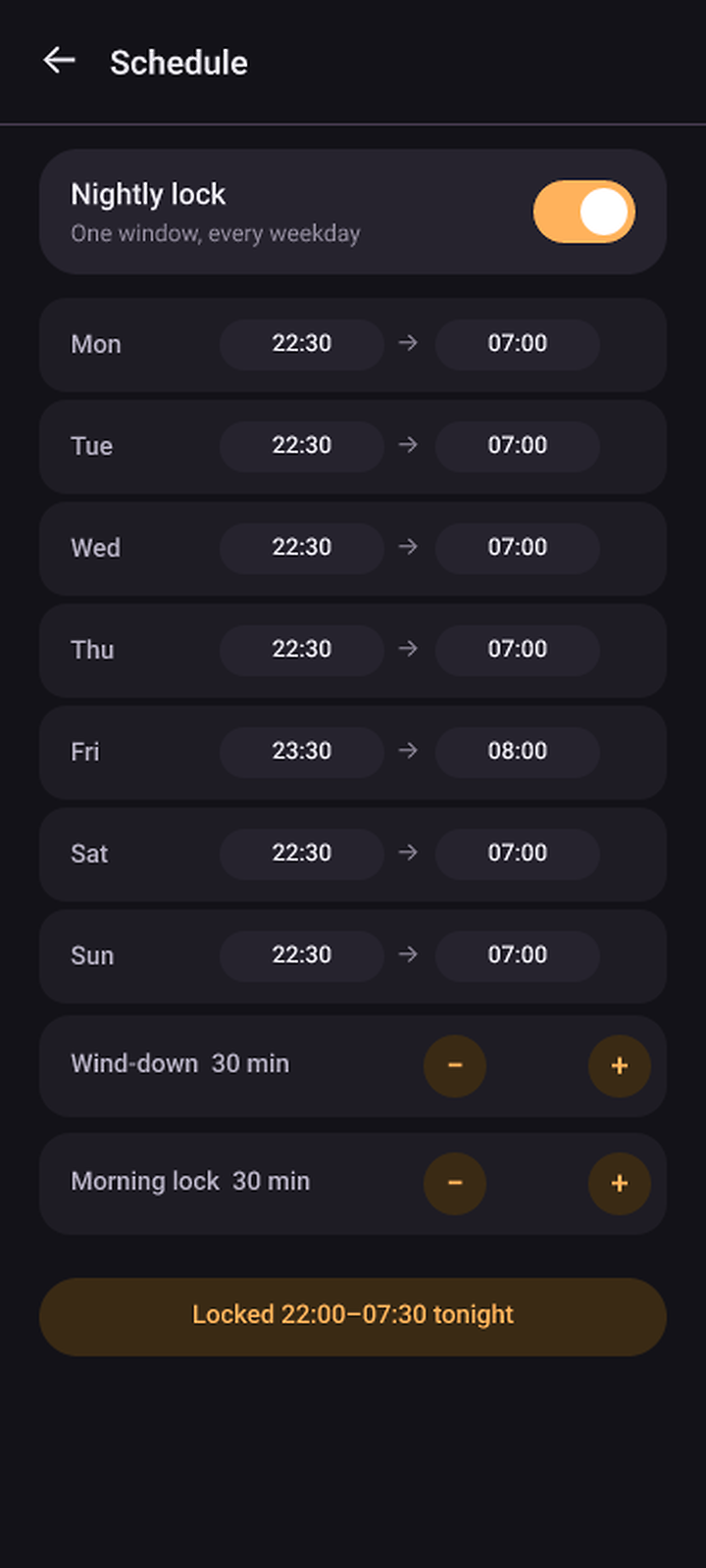
Set bedtime and wake time for each weekday, plus a wind-down before bed and a morning lock after waking. During locked hours the app is closed rather than merely quiet — and the budget cannot be spent.

Real exact alarms fire on each boundary, so the lock flips while the phone is idle in your pocket.

Schedule screen: nightly lock on, per-weekday bedtime and wake times from Monday to Sunday, wind-down and morning lock steppers.

On-device maintenance

Broken rule? Rebuild it on the phone.

When a screen changes, guided node capture walks you to the right view and dumps the live hierarchy. Patch the rule override in-app, save it, and the running service picks it up immediately — no restart, no cable, no second device.

01 capture 02 patch 03 live

Rule inspector

Eight rules, all of them readable.

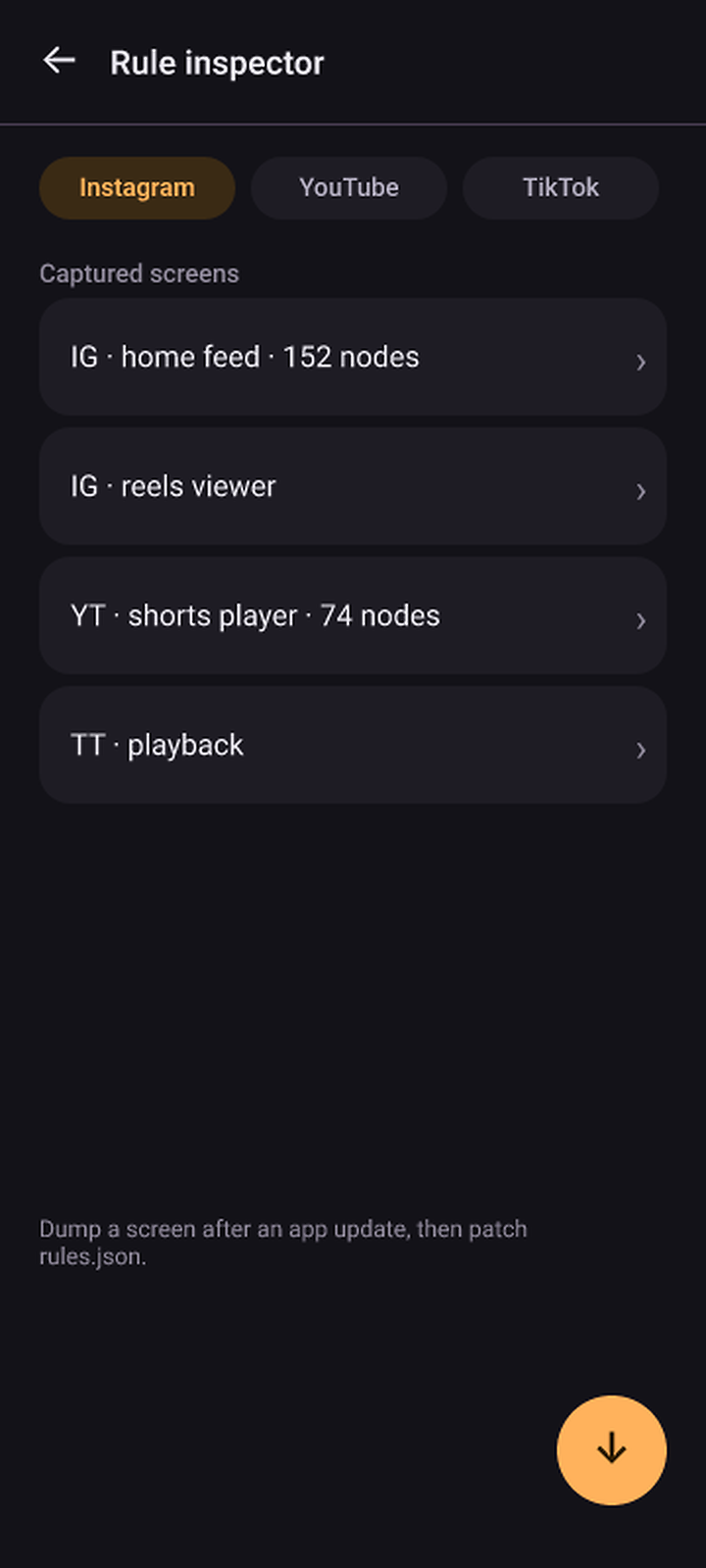
The whole catalog is a JSON asset — six enabled rules, two retired ones kept as evidence. The inspector shows the node tree, view-ids and bounds behind every match, and exports what it saw.

// rules.json — yt_shorts_player
{
  "id": "yt_shorts_player",
  "appPackage": "com.google.android.youtube",
  "surface": "shorts_player",
  "match": {
    "viewId": "com.google.android.youtube:id/reel_recycler"
  },
  "action": "BACK"
}

03 / Honest rules

Built on honest rules.

A blocker that finds Reels by looking for the word “Reels” works in exactly one language and breaks on the first rename. This one matches structure — and shows you the working.

Locale-proof anchors

An enabled rule may only be proved by a signal that survives a language change: a view-id, a class name, or the geometry of the screen. Localized text is a hint that can go missing — it is never the proof.

Six of the eight shipped rules are enabled; the other two are retired evidence, kept disabled on purpose. The build fails if an enabled rule has no locale-independent anchor, or if that anchor is not cited against a recorded XML dump.

view-id="…:id/clips_viewer_view_pager"proof
classNameRegex="androidx.viewpager2…"proof
bounds · full-screen containerproof
contentDescription="Reels"optional hint
visible textnever the only proof

How a rule is born

Not from a PC, a cable or a scrape of the store listing. From the screen itself, on the phone that has the app installed.

  1. 01Open the screen you want recognised in the target app.
  2. 02Arm guided capture. Progress and “Stop now” live in a notification; the dump records view-ids, text, bounds and classes.
  3. 03Save it as a rule override, editable in-app. The running service re-reads it on the spot.
Rule inspector: per-app tabs, captured screens with node counts for the Instagram home feed, reels viewer, YouTube Shorts player and TikTok playback.

When an app updates, rules fail open — on purpose.

A rule that stops matching does nothing at all. That is the design: letting a reel through is annoying; blocking the wrong screen is worse. So a stale rule never pretends to work — it goes quiet, and the app says so.

Free Social remembers the version each rule set was verified against and compares it with what is installed. You get a warning with one action on it: capture the new screen and re-verify. No silent failures, no invented certainty.

04 / Privacy

No accounts. No analytics. No socket.

This is a permission list, not a policy page. You can check every line of it inside the APK you downloaded.

There is no backend to trust, because there is no backend. Nothing about you leaves the phone.

Settings live in SharedPreferences on the device. Rule sets are assets inside the APK. Every decision is made in-process, from the view tree that is on screen at that moment.

There is no sign-up, no crash reporter, no analytics SDK and no ad library. There is nothing to delete, because nothing was collected.

<!-- AndroidManifest.xml -->
<uses-permission android:name="…SYSTEM_ALERT_WINDOW" />
<uses-permission android:name="…USE_EXACT_ALARM" />
<uses-permission android:name="…POST_NOTIFICATIONS" />
<uses-permission android:name="…REQUEST_IGNORE_BATTERY_OPTIMIZATIONS" />
<!-- no android.permission.INTERNET anywhere -->

No write access, no network stack, no remote anything: the app cannot open a socket, so there is nothing to leak.

INTERNET absent
Not requested. No uploads, no sync, no remote config, no usage ping.
BIND_ACCESSIBILITY_SERVICE content filter
Walks the view hierarchy while Instagram, YouTube or TikTok is on screen. Other apps' trees are only ever read by the ghost-tree self-check, which asks whether a target is hiding content — nothing is stored.
BIND_ACCESSIBILITY_SERVICE block service
Window changes only; content retrieval is switched off in its config. Reads a package name and nothing else.
SYSTEM_ALERT_WINDOW
Draws the 2.2-second escape flash over the app. It cannot stack, cannot linger and has no dismiss button.
REQUEST_IGNORE_BATTERY_OPTIMIZATIONS
Optional, asked once. Keeps the service from being frozen mid-evening by an aggressive power profile.
USE_EXACT_ALARM
Schedule boundaries fire on time — bedtime, wake, wind-down, morning lock.
POST_NOTIFICATIONS
Progress and “Stop now” during node capture. Denial is handled in-app; capture still works.
<queries> · 4 packages
Instagram, YouTube, TikTok (global and trill). Used to launch the app while capturing a screen.

No contacts, no location, no storage, no camera, no microphone, no AD_ID.

05 / Limits

What this doesn't do.

Every tool has edges. These are the ones you will actually meet — stated before you install, not after.

  • 01

    Rules drift after app updates

    An app update renames a view and the rule stops matching: the reel shows, and the app tells you why instead of pretending. Fixing it takes a node capture, not a new release — but it is maintenance, and calling it magic would be a lie.

  • 02

    Battery savers kill accessibility services

    Some Android builds freeze background services within minutes of the screen going off. Free Social asks for a battery exemption once, then shows a persistent banner when enforcement is degraded. It cannot force the issue, and it will not claim to.

  • 03

    Sideload only

    No Play Store listing. You install an APK and grant a permission that reads as alarming — because it is powerful. You give it to three apps, and you can revoke it in Settings whenever you like.

  • 04

    It filters short video, not the feed

    Your feed, DMs, comments and search are untouched, on purpose. This is not a screen-time tracker, a DNS blocker or a parental control. It is one specific intervention, done carefully.

06 / Download

Take the twenty minutes back.

  • 0accounts
  • 0trackers
  • 0servers

A signed release build, zipped with a README. Unzip it, tap the APK, allow the install. Android 12L or newer; Android 13+ needs the extra “Allow restricted settings” toggle from step two.

Download Free Social 0.4.1 8.2 MB

v0.4.1 · 1e7b5a1 · 8.2 MB · minSdk 32 sha256 2e9439c32911bc9eb9130ca94735bc9a7da39e02de80ea86829d9b81e8d05024

  1. 01Unzipfree-social-0.4.1-1e7b5a1.apk plus a README.
  2. 02Allow the installYour file manager will ask to install unknown apps.
  3. 03Enable the serviceAllow restricted settings first on Android 13+.